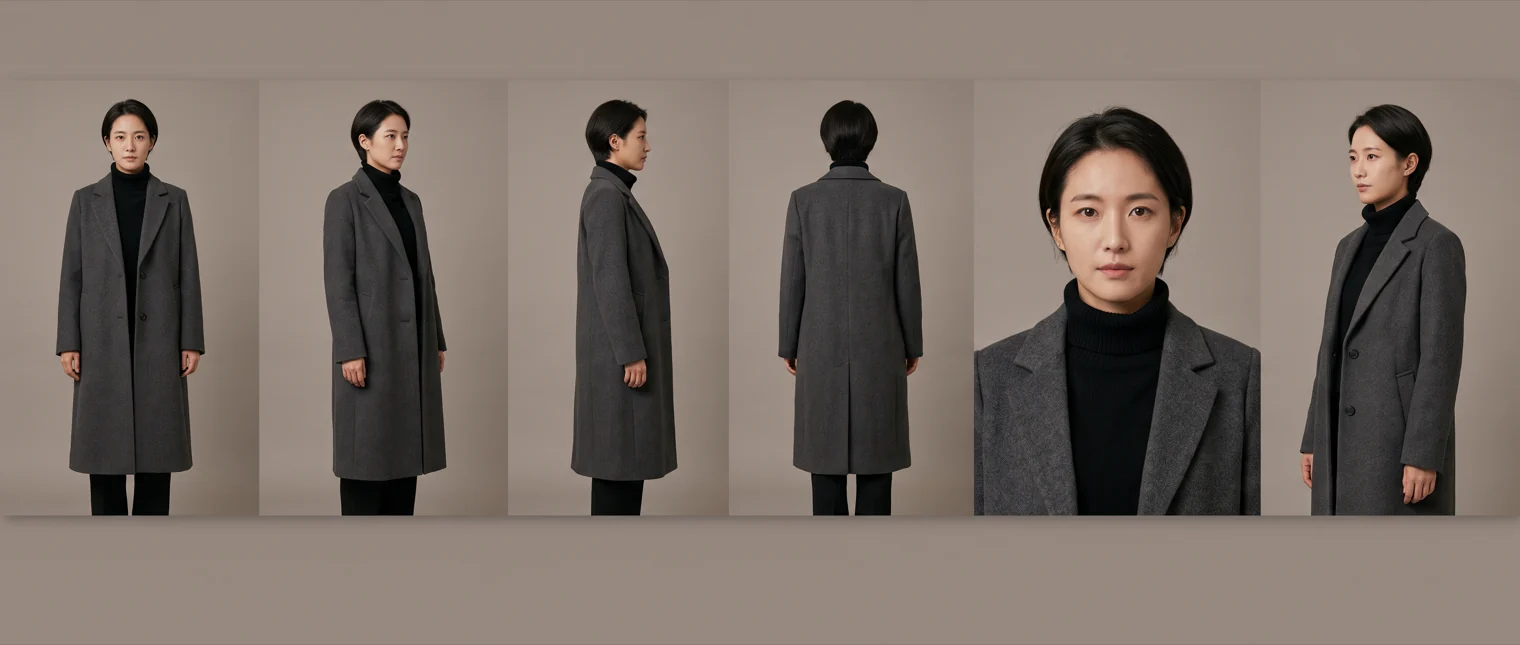
Every generated shot starts from nothing. The model has no memory of the shot before it. Your character walks out of frame wearing a grey coat and walks into the next shot with a different face.
Two fixes exist. Most people find one of them, use it everywhere, and never work out why half their shots still drift.
Build the sheet first
Language is lossy. "The same woman from the last shot" carries none of the pixels that made her the same woman. So you build the pixels once, before you shoot anything, and attach them to every generation she appears in.
The form comes from animation, where it is called a model sheet or a turnaround. Six panels covering one character: front, three-quarter, profile, back, a head-and-shoulders close-up, and a waist-up medium shot. Flat even lighting. A neutral backdrop. The character at the same height in every panel.
Three details decide whether it holds:
- Cover the angles you will actually shoot. Reference systems lean toward front-facing faces, so a character with only a front view on file slips the moment she turns to profile. The back view earns its place the first time someone walks away from camera.
- Take the props out of her hands. A held object drifts angle to angle and drags the character with it. Give a significant prop its own sheet, then combine the two at shot time.
- Generate four, keep one. Sheets vary. Picking the strongest of four costs one round and pays for itself across every shot in the film.
That close-up panel is quietly doing the most work. Scars, earrings, the exact hairline: those live at a scale the full-body panels cannot resolve, and they are the first things a viewer catches going wrong.
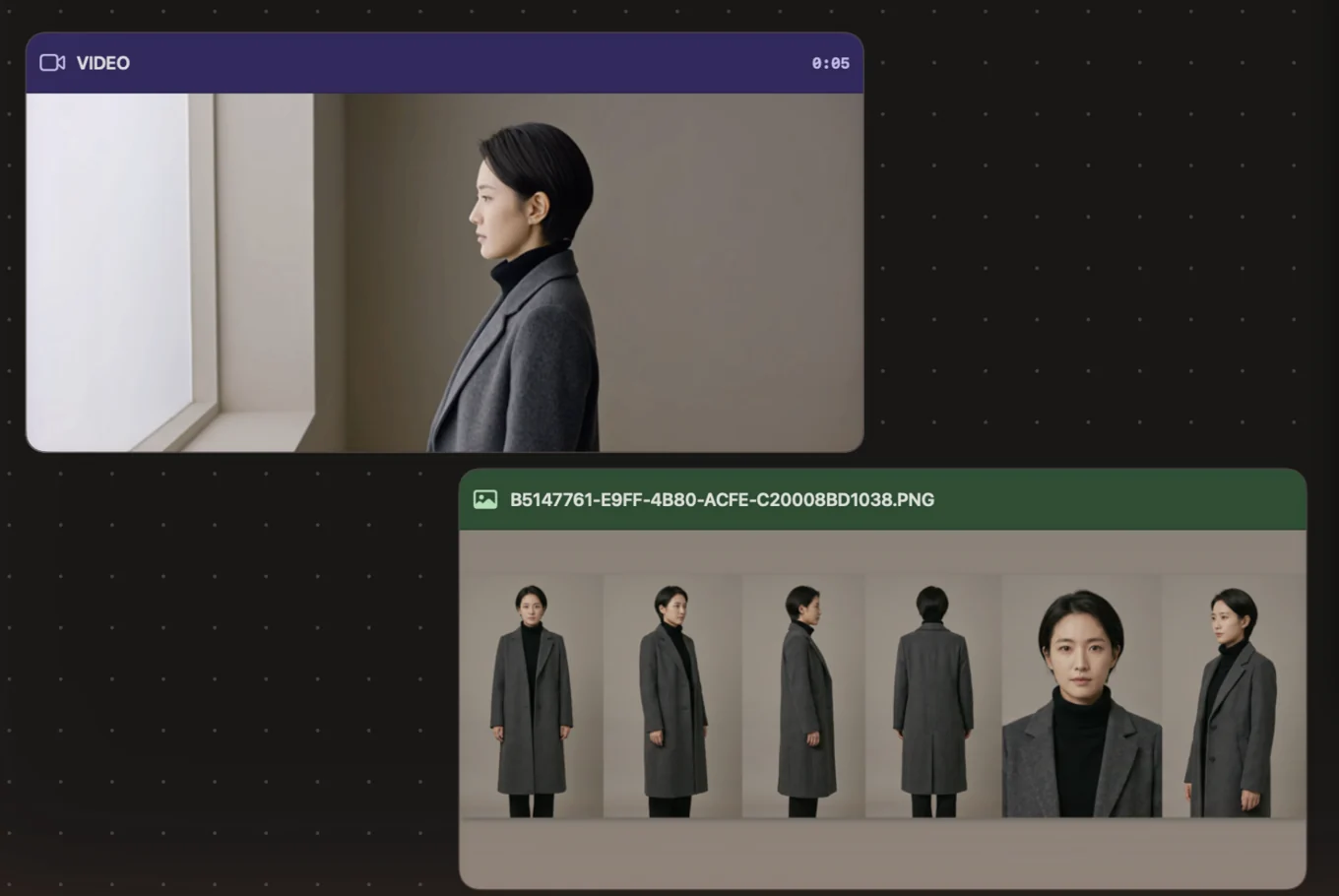
The sheet sits on the canvas and the shot comes off it. Same face, same coat, same roll-neck, in a room the sheet never showed.
Then chain what just happened
A sheet cannot tell the model that her coat is open now, that she is mid-turn, that the light moved to the left. That information is two seconds old and it lives in the previous shot.
Take the last frame of the finished shot and start the next one from it. Right-click any finished card:
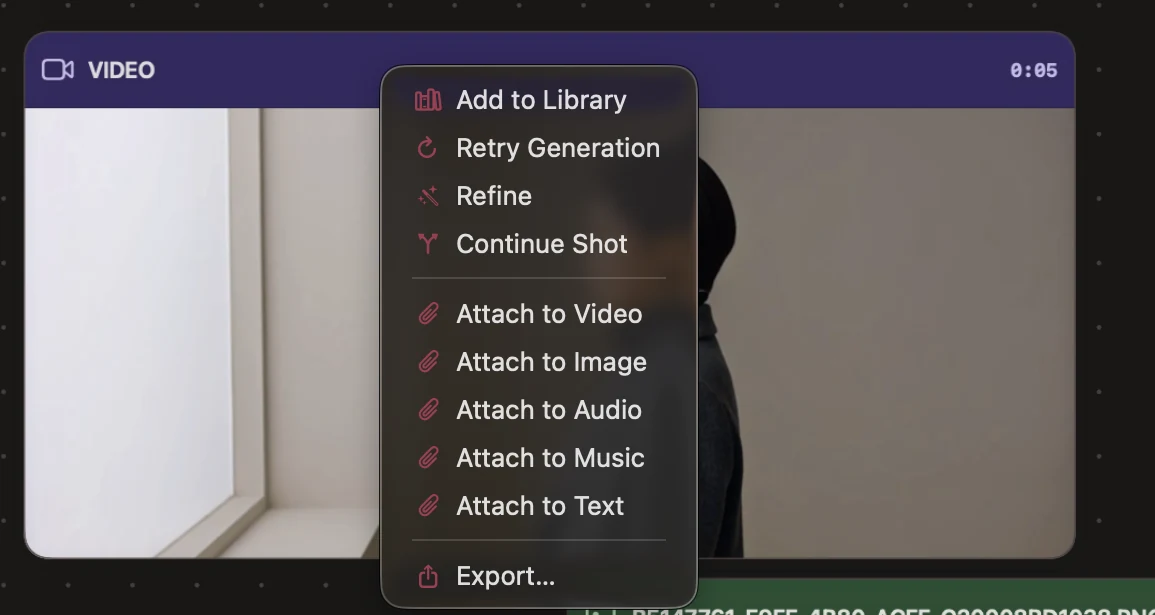
The next shot opens on the exact pixels the last one closed on, so wardrobe state, blocking and light direction all carry across the cut.
A sheet says who she is. A frame says where she just was.
Chaining inherits everything, mistakes included:
- Motion blur in the seed frame. A blurred last frame seeds a blurred first frame. End shots on settled motion.
- Drift over long chains. Five links in, small errors compound. Re-attach the sheet every three or four shots and the chain gets pulled back to the original face.
- Scene changes. A new location deserves a clean start. Chaining across a scene boundary drags the old room's light into the new one.
Picking a model
A start frame and a reference sheet are different inputs, and one shot takes both at once. Start frame holds the last frame of the shot before it. Attach holds the sheet.
Models differ in how many references they carry, so the setup panel changes with the model you pick. Seedance 2.5 carries the most of anything in the roster, which is what you want once a scene has two or three characters and a location plate to hold at the same time. Others take a handful, enough for one character. Pick from what the shot is carrying, and the panel will show you what that model accepts.
Just ask for it
Cask MCP connects the editor to Claude and Codex, so you can drive all of this by asking. It is on every plan, Free included.
"Continue shot 2 from its last frame. Keep her on the reference sheet. She turns from the window."
The agent extracts the frame, attaches the sheet, and sets the shot up in your timeline. You watch it happen on the canvas.
You can stay conversational the whole way through. Ask for another take with the coat buttoned. Ask it to re-attach the sheet across the last four shots when a chain has drifted. Every quote comes back before anything is spent, so a retake stays a decision.